Upgrading Control4 and Savant to Crestron Home: A Complete Migration Guide
How to Migrate Your Smart Home System Without Rewiring Your Entire House
Most homeowners who built their smart homes five to ten years ago with Control4 or Savant face a similar frustration: the system works, but it feels dated. The interface is clunky. The app requires too many taps. Adding new devices is needlessly complex. And if your original installer has moved on, making even simple changes means calling a dealer.
The good news is straightforward: migrating to Crestron Home doesn’t mean ripping out your infrastructure. Your existing cabling, network, and low-voltage wiring remain perfectly functional. What changes is the equipment on top of it — the controller, touchpanels, and keypads. That distinction transforms the migration into a focused equipment upgrade rather than a full rewire, with genuine improvements in usability, reliability, and expandability.
We’ve migrated dozens of Control4 and Savant systems to Crestron Home. This guide covers exactly what stays, what changes, why you’d want to upgrade, and how to plan the migration without disruption to your daily life.
—
Why Upgrade Your Control4 or Savant System?
Before diving into the how, it’s worth understanding the why. These aren’t hypothetical benefits — they’re what clients repeatedly cite as decision-makers.
Modern interface and user experience. Crestron Home’s interface has evolved dramatically. Modern graphics, responsive touch panels, and app design that feels genuinely contemporary (not “from 2014”) make daily use less frustrating. Guests don’t need a tutorial to adjust lights or temperature.
Scalability for complex homes. Control4 works well for 3,000–5,000 sq ft homes with standard layouts. Savant excels in design-focused luxury spaces. But once your home exceeds 8,000 sq ft, has multiple buildings, or involves very specific integrations (distributed video, large HVAC zones, pools, gates, motorised skylights), Crestron Home’s architecture becomes a decisive advantage. You don’t hit performance ceilings.
Third-party flexibility. Crestron integrates more deeply and more natively with systems like Lutron lighting, Trinnov calibration, and enterprise security than Control4 or Savant. If you’re building or upgrading lighting simultaneously, Crestron + Lutron is the gold standard partnership.
Longevity and ecosystem momentum. Crestron has published validated system sizing for 2026 (April 2026 update moved the CP4-R from supporting 300 to 500 lighting loads, 25 to 100 cameras, 32 to 100 thermostats). They continue publishing roadmaps and firmware updates. The platform shows genuine momentum rather than stagnation.
Dealer availability and support. In many regions, Control4 and Savant installer networks have consolidated or struggled. Crestron dealers remain robust and competitive. You’re not dependent on your original installer to make changes.

Crestron Smart Homes

Lutron Lighting

Whole House AV

Security Systems
Lighting Design
—
What Stays: Your Infrastructure Is Fine
This is the critical reassurance that clients need to hear: your cabling, network, and low-voltage infrastructure do not change.
Most Control4 and Savant systems run on Cat5e or Cat6 structured cabling, with a central distribution point in your AV rack. That infrastructure is perfectly compatible with Crestron Home. Both platforms run on Ethernet, both use PoE (Power over Ethernet) for keypads and touchpanels, and both follow standard low-voltage cabling practices.
In fact, if your home was properly cabled during initial installation — which most premium systems are — your network backbone is likely overbuilt for current demands. A properly designed Cat6 run can deliver 10Gbps speeds; Control4 and Savant typically consume 100Mbps or less across the entire system. Crestron Home will actually benefit from that same overbuilt infrastructure.
Cable types and compatibility. Control4 uses standard Ethernet (Cat5e minimum, Cat6 preferred). Savant uses Cat6 structured cabling with proprietary control modules over Ethernet. Crestron Home uses Cat6 or Cat6A PoE. All three are network-centric and fully backward-compatible. When you migrate, you’re reusing the same cable runs, the same termination points, and the same core topology.
What you might upgrade during migration — optionally. While your cabling stays, this is an ideal moment to consider:
- Enterprise WiFi refresh. If your home’s WiFi is still consumer-grade (a standard router in the hall cupboard), this is the time to add mesh WiFi or access points. Crestron systems benefit enormously from reliable, distributed WiFi. We typically recommend Ruckus, Ubiquiti, or Cisco access points strategically placed to blanket your home with strong signal.
- Network switch upgrade. If your core switch is 10+ years old, a refresh to a managed PoE switch improves reliability. But this is optional — many legacy switches continue working perfectly.
- Rack organisation and cable management. With new equipment arriving, it’s smart to consolidate the rack, replace failing patch cables, and properly label everything. Not essential, but it pays dividends in longevity and serviceability.
The mental shift: you’re not rewiring. You’re refreshing the brains and the interfaces on top of a solid foundation.
—
What Changes: Controllers, Touchpanels, and Keypads
The actual migration is surgical — specific devices swap out, nothing else moves.
The controller. Control4 systems use an EA-5 (or older EA-3) controller, typically in your AV rack. Savant uses a Savant Pro Host or Power Module. Both are rack-mounted processors managing the entire system. With Crestron Home, you’re replacing this with a CP4-R or MC4-R processor. These are smaller, quieter, and more powerful. The migration path is straightforward: decommission the old controller, rack the new Crestron processor, run its network cable to your existing switch, and configure it on your network.
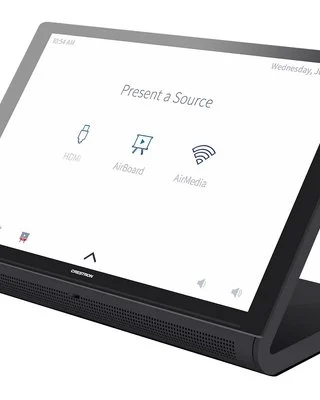
Touchpanels. Control4 systems typically have touchscreen panels (T3, TS-1060 etc.) mounted on walls or sitting on tables. Savant uses Savant Host touchscreens. Crestron Home supports Crestron’s own touchpanels (DM-MD32X32 for video distribution, DM-MD64X64, or the smaller CHV-TPXS, CHV-TPXL), as well as industry-standard touchscreens via control protocols.
For most migrations, you’ll replace the touchpanels with Crestron equivalents. These mount in the same wall boxes, often using the same power and network cabling. Depending on the original installation, you might keep the same faceplate and cut-outs, or invest in new stylish faceplates from Crestron’s Cameo or other lines.
Keypads and wireless controls. Control4’s wireless keypads (KPX, KPX-E) and Savant’s wireless controls don’t directly map to Crestron devices. However, Crestron Home supports a wide range of keypads — wired (Aria, Alba, Cameo models), wireless (Crestron’s infiNET EX wireless line), and even third-party wireless keypads via integrations. During migration, you’ll typically replace Control4/Savant keypads with Crestron equivalents. The good news: new Crestron keypads are often significantly more robust and visually appealing than legacy Control4 hardware.
Cabling for new hardware. New Crestron processors, touchpanels, and keypads use standard Cat6 runs back to your network infrastructure. Most of the time, you’re reusing existing cable runs. If a new panel location doesn’t have existing cabling, you’ll run new cable — but this is typically a minor addition, not a wholesale rewire.
—
Integrating Lutron Lighting: Existing Systems and New Installations
Lutron lighting deserves its own section because the integration path differs depending on your current lighting setup.
Scenario 1: You already have Lutron lighting separate from Control4/Savant. Many homeowners installed Lutron RadioRA 2, RadioRA 3, or Homeworks QSX lighting systems independently from their Control4 or Savant systems. These systems can coexist — Lutron lighting talks to the Lutron hub, Control4/Savant controls everything else. When you migrate to Crestron Home, Crestron integrates natively with Lutron via their standard integration protocol. Lighting scenes that were previously separate become unified within Crestron — you can now create a scene like “movie mode” that dims Lutron lights, closes motorised blinds, and sets climate all from one Crestron touchpanel or app. No re-wiring required; the Lutron lighting infrastructure stays exactly as is.
Scenario 2: You have legacy lighting without Lutron — upgrading during migration. If your home uses standard dimmers controlled by Control4, or if you simply want to upgrade to professional-grade lighting control, this is the ideal moment. Lutron RadioRA 3 (wireless retrofit) or Homeworks QSX (wired, gold-standard) can be installed in parallel with your Crestron Home migration. The synergy is powerful: Crestron handles AV, climate, security, and automation logic; Lutron handles lighting and shading with sophisticated scene programming and circadian rhythm tuning. Both systems talk to each other and to your mobile app as one unified ecosystem.
For retrofit installations, Lutron RadioRA 3 is particularly valuable — wireless dimmers retrofit into existing switch boxes without running new wiring. You can upgrade your lighting gradually, room by room, without disrupting Crestron’s deployment.
Scenario 3: You have Lutron already and want to upgrade keypads/shading simultaneously. If you’ve had Lutron Sivoia shades for years, or Homeworks lighting, the controller and scene logic stay unchanged. When you add Crestron Home, the integration deepens — Crestron becomes the master for unified scenes, voice control routes through Crestron, and the mobile app feels consistent. Your Lutron infrastructure — the wiring, the dimmers, the shades — all remain perfect. Only the control logic and interface evolve.
The takeaway: Lutron and Crestron are built to work together. If you don’t have Lutron, a migration is an excellent trigger to add it. If you do, upgrading shading or adding wireless retrofit lighting is seamless during the Crestron deployment.
—
WiFi and Network Upgrades During Migration
Your existing network backbone is reused, but this is an ideal time to assess and upgrade your wireless infrastructure.
Why WiFi matters for smart homes. A smart home’s reliability depends entirely on network quality. Crestron systems have local processing (hardwired devices and scene automation work even if internet drops), but remote access, cloud features, and real-time updates need solid WiFi. Consumer WiFi — a standard ISP router in the hall cupboard — cannot deliver the coverage and reliability a serious smart home demands.
Enterprise WiFi options during migration. Most of our clients upgrade to mesh WiFi or enterprise access points during a Crestron deployment. Ruckus (Unleashed or managed), Ubiquiti (UniFi), or Cisco (Meraki or small business line) are industry standards. These systems provide:
- Blanket coverage across your entire home — no dead zones where security cameras or connected devices drop offline
- Band steering and traffic prioritization — your Crestron system and security cameras always get priority over someone streaming video
- Easy onboarding of new devices with a single network name and password
- Cloud management and visibility, though they operate locally if internet drops
Existing Cat6 infrastructure benefit. If your home was cabled with Cat6 during initial construction, your network backbone is likely already overbuilt. Access points simply plug into existing ports or new runs are added to strategic locations. This is far cheaper than retrofitting an entirely new network infrastructure.
—
Migration Timeline and Process
Typical timeline. A complete migration from Control4/Savant to Crestron Home typically takes 2–4 weeks, depending on system complexity and your home’s size. Schedule:
- Week 1: Assessment and planning. Your dealer surveys the existing system, documents all hardware, reviews your desired feature list, and plans the new Crestron configuration and touchpanel/keypad layout.
- Week 2–3: Installation and commissioning. Old controller decommissioned, Crestron processor racked, touchpanels and keypads removed and replaced, wiring verified, all devices configured and tested. This usually happens over 3–5 days of on-site work.
- Week 4: Training and refinement. Your household learns the new interface, scenes are fine-tuned, and any integration issues are resolved. This phase typically takes a few days to a week as your dealer handles questions and adjustments.
What’s included in the migration: New Crestron processor, touchpanels, keypads, installation labour, system programming, testing, and handover training.
What’s not typically included: Lutron lighting (if upgrading simultaneously), electrical work beyond control system wiring, structural modifications, or ongoing support beyond the first 30 days.
—
Why Choose Crestron Over Control4 or Savant?
When migration makes sense, it’s because your current system no longer serves you. Crestron Home offers several genuine advantages for clients ready to upgrade.
A modern, responsive interface is table stakes — Crestron’s iPad and web interfaces feel contemporary and intuitive. Lutron lighting integration is seamless, making it the obvious choice if you’re upgrading lighting during the migration. For large or complex homes, Crestron’s architecture scales without compromise. And dealer support is robust — you’ll never be stranded if your original installer is no longer available.
That said, Control4 and Savant remain viable platforms. If your current system works for you and your dealer is responsive, there’s no urgency to migrate. Migration is worthwhile when your system feels outdated, your dealer is unavailable, or you’re planning an expansion your current platform struggles to handle.
—
Frequently Asked Questions
Will my existing keypads and touchpanels work with Crestron Home?
No. Control4 and Savant hardware is proprietary to those platforms. You’ll need to replace touchpanels, keypads, and remotes with Crestron-compatible equivalents. The good news: modern Crestron hardware is more responsive, visually polished, and reliable than legacy Control4 or Savant devices.
Do I need to rewire my house?
No, not if your existing cabling meets Crestron’s standards (Cat5e minimum, Cat6 preferred). Your existing Ethernet backbone, power distribution, and low-voltage runs remain in place. Only the equipment at the endpoints changes.
Can I migrate gradually, or does it have to be a big bang?
Gradual migration is possible but typically more disruptive than a planned cutover. Most dealers recommend a scheduled migration where the old system is decommissioned and the new one is brought online over 3–5 days. This minimizes confusion and ensures all systems are tested together.
What about my Lutron lighting if I have it?
Lutron lighting stays exactly as is. Crestron Home integrates with Lutron’s control protocol, so your scenes become unified across both systems. No re-wiring, no device changes — just deeper integration through the new Crestron controller.
What if I want to add Lutron lighting during the migration?
Excellent time to do it. Crestron and Lutron are built to work as partners. RadioRA 3 can be installed in parallel (wireless retrofit, minimal wiring), or Homeworks QSX can be specified for the new system. Both integrate seamlessly with Crestron.
How reliable is Crestron Home compared to my old system?
Crestron Home is significantly more reliable for most homeowners. Fewer driver issues, better firmware maturity, more comprehensive testing. That said, reliability depends heavily on installation quality and network infrastructure. A well-installed Crestron system on solid WiFi will outperform almost any legacy Control4 or Savant setup.
Can I upgrade my WiFi at the same time?
Absolutely. In fact, we recommend it. Enterprise WiFi (Ruckus, Ubiquiti, Cisco) installed during your Crestron migration ensures your entire system benefits from reliable connectivity.
What happens to my old Control4 or Savant system after migration?
Typically, the old controller and touchpanels are removed from your home and decommissioned. Some dealers offer to hold onto them temporarily in case you want to retrieve historical data or media. For security reasons, we recommend the old hardware be securely wiped and recycled.
Migration Done Right
Upgrading from Control4 or Savant to Crestron Home is not about admitting your old system failed. It’s about recognizing that technology has matured, your needs have evolved, and a better foundation exists for the next decade of your home’s automation journey.
Your infrastructure is good. The cabling you paid for ten years ago is still valuable. What changes is the brains — the controller, interfaces, and how those systems talk to each other. It’s a thoughtful investment with genuine improvements in reliability, flexibility, and usability.
If your Control4 or Savant system feels outdated, or if you’re planning an expansion that your current platform struggles to handle, a migration conversation is worth having. Custom Controls has completed dozens of these migrations, and we can walk you through exact timelines and what your new system would look like.
Get in touch for a free consultation. We’ll assess your existing system, answer specific questions, and provide a clear migration plan.