

Home Network Audit and Rescue for Large Homes
Find Out Why Your Wifi Fails, Then Fix It
Most large homes that come to us with wifi problems have already spent money on them. There are extenders in the hall, a mesh kit in the loft, a router supplied by the broadband provider, and a network that has grown room by room without anyone drawing it. The symptoms are familiar: dead zones in the rooms that matter, video calls that freeze, smart home devices that drop offline, a cinema that buffers, cameras that stop recording, and a household that reboots the router as routine. A network audit establishes what is actually wrong, with evidence, before anything is bought or replaced.
Our audit is designed for large houses and estates, where the cause is rarely a single fault. It is usually a combination of building construction, cabling, equipment placement, configuration and age. We survey the network that exists, measure how it performs in every part of the property, and set out in plain English what to repair, what to keep and what to replace, so that the next pound spent goes where it will make a difference.
Why Consumer Wifi Fails in Large Homes
Consumer routers, extenders and mesh kits are designed for flats and ordinary houses. In a large property, thick masonry, steel, concrete floors and long distances defeat them, and every extender or mesh node added to compensate shares the same radio spectrum it uses to serve your devices, so each hop reduces the bandwidth left for the household. Add the growth of cameras, controllers, streaming devices and guests, and a network that was adequate five years ago is now the weakest part of the house. Our guide to wired and mesh wifi explains the difference in detail.
The failures follow a pattern. A router in the hall serves the rooms nearest to it and little else; extenders repeat the signal at a fraction of the speed; and devices cling to a distant access point long after a closer one would serve them better, because the device, not the network, decides when to move. Streaming, video calls and control systems then suffer in different ways, and the household blames whichever device is complaining. In many large homes the router supplied by the internet provider is also doing everything at once, acting as firewall, wifi, DHCP and DNS server, with no way for anyone to see what is going wrong. Separating those roles and wiring the access points back to a proper network core is the foundation of the fix.
What the Audit Covers
The building. Construction, floor structures, layout and the position of outbuildings, together with where coverage is genuinely needed, including terraces, the pool house, the garden and the gatehouse.
Cabling. What exists, its type and condition, where it runs, how it is terminated and whether it can be reused.
The equipment cabinet. Its location, ventilation, power, labelling and tidiness, and whether the network core has battery backup.
Switching and power. Whether switches are managed or unmanaged, the speed of the links between them, and whether PoE capacity matches what the access points, cameras and door stations demand.
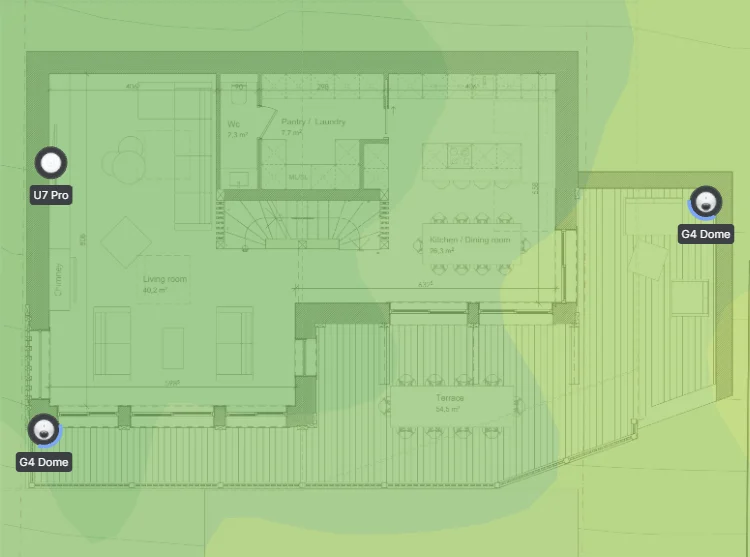
Wireless performance. Access point models, positions, channels and power levels, with coverage, throughput and roaming measured room by room on the existing system, not predicted from a floor plan.
The internet connection. Line type and speed, provider equipment, double address translation, single points of failure and whether there is a backup connection.
Structure and security. Whether personal devices, guests, cameras, controllers and smart devices share one flat network, default passwords, firmware age, exposed remote access, and a full inventory of every connected device.
Dependent systems. How automation, lighting, audio, video, cinema, CCTV and access control use the network, and where they struggle.
What You Receive
A written report in plain English, with heat maps of the existing wireless coverage, photographs and a map of the equipment cabinets, and findings ranked by their effect on the household. For each finding we say what to keep, what to change and why, and we set out the options: a fully wired rebuild, a hybrid approach that wires the key locations and extends to the rest, or a less disruptive retrofit where cabling is impractical. Where existing cabling and equipment are sound, the plan reuses them, and larger changes can be phased around the household.
 Managed Home NetworkRemote monitoring, updates and support for large homes and estates.
 Network Takeover and SupportA network installed by someone else, documented, secured and supported.
 Wired Wifi vs Mesh WifiHow wired, mesh and hybrid networks compare in a large home.
 Home Wi-Fi and NetworkingEnterprise-grade networks for every room, terrace and the grounds.
 Kensington Mews Crestron InstallWireless Retrofit, No Rewiring
Quick Wins and the Proper Rebuild
Some faults can be corrected during the audit: moving a badly placed access point, correcting channel and power settings, removing a second router that is double-translating addresses, separating cameras and smart home devices from personal devices, and updating firmware. Others need a rebuild, such as adding cabling, replacing unmanaged switches, replacing consumer access points with wired enterprise ones, or running fibre to an outbuilding. We separate the two clearly, so you know what is a repair and what is an upgrade.
Each finding in the report is classed by what it will take to fix, what it affects and how urgent it is, so that corrections which protect the household, such as unsupported firmware on an internet-facing device or cameras sitting on the same network as personal laptops, come first. A rebuild is then planned as a sequence rather than a single upheaval, which matters in a house that is lived in or staffed: work can be phased around the household, with the existing network kept working until the new one is proven. Where a fault turns out to lie in the internet connection rather than the network inside the property, the report says so and sets out the options.
Estates, Outbuildings and Grounds
Multi-building properties add their own failures: links between buildings improvised with powerline adapters or a wireless extender, a gatehouse that loses its connection in bad weather, and grounds without coverage where staff and cameras need it. The audit examines each link and recommends the right medium, fibre in duct where it can be laid and a point-to-point wireless bridge where it cannot, along with power and surge protection for equipment housed in outbuildings.
Outbuildings also tend to be where the weakest equipment sits. A switch in a garage or plant room with no ventilation, a power supply shared with a heater or a long copper run between buildings produces faults that never appear on an indoor network. We check how each building’s connection is carried, whether the equipment is protected from damp, cold and surges, and whether the distance and the medium are within what the standard allows. Coverage outdoors is assessed for what it has to do, such as cameras on the drive, handhelds for staff or music on a terrace, rather than simply blanketing the grounds, and the report distinguishes between them.
Period and Listed Properties
Thick masonry and protected interiors make wifi hardest in the homes that most deserve it. We have worked in Grade I and Grade II listed properties where cable routes must be agreed with conservation officers, and the audit identifies discreet access point positions, existing routes that can be reused and where a hybrid approach avoids new work to protected fabric.
In these properties the question is rarely how much wifi is wanted but where equipment can go without harming the building. Access points can often be placed on joinery, in cupboards or on ceilings where an existing opening can be reused, and some are small enough to be finished to match their surroundings. We look at what already runs through the building, such as old bell wires, redundant conduits and lighting routes, and whether it can carry new cabling without further intervention. Where new cabling is required, we work with the conservation officer and the architect to agree it before anything is fixed, and the audit report sets out what can be achieved with no new work to protected fabric and what would need approval.
From Audit to Action
The report is written for the owner and for whoever runs the property day to day, and it is designed to be shared with an architect, a project manager or another contractor. It includes the plans and photographs needed to act on it, a prioritised list of recommendations and, where relevant, the points to raise with your internet provider, so that the work can be carried out by us or by anyone else.
The report stands on its own: it says what is wrong and what it would take to fix it. If you proceed with us, the same engineers carry out the work, and the network can then continue into managed monitoring and support. If the network was installed by another firm and you want us to take responsibility for it, our network takeover service picks up where the audit finishes. To arrange an audit, get in touch.
Home Wi-Fi and Networking → · Managed Home Network → · Arrange a network audit →
Network Audit FAQs
- Why not just add more access points or a bigger mesh system?
Adding equipment to a network that has not been diagnosed often makes it worse, because extra nodes compete for the same spectrum and add more devices to a flat network. The audit finds the actual cause first, whether that is cabling, placement, configuration or the internet connection, so that spending is targeted. - Do I need to replace everything?
Not necessarily. The audit identifies what is sound and can stay, what can be reconfigured and what should be replaced. Good cabling and good switches are often reused, with the weakest elements, typically consumer access points and unmanaged switching, replaced. - Can you reuse existing cabling?
Where it is the right type, in good condition and correctly terminated, yes. We test what is there and report on it. Cabling that is unsuitable, damaged or poorly routed is identified, with the options for replacing or bypassing it. - Will the audit disrupt the household?
The survey is largely non-intrusive. Some tests need brief interruptions to connectivity, and we plan these around the household and tell you beforehand. - Will you audit a network another firm installed?
Yes. We report on what we find in plain terms, whatever the equipment and whoever installed it, and we say clearly where something is fit for purpose as well as where it is not. - Does the audit cover cameras, audio and smart home systems?
Yes. These systems depend on the network, and many apparent device faults are network faults. We examine how each system uses the network and where it is affected by problems in the wired or wireless infrastructure. - What is the difference between an audit and a takeover?
An audit finds out what is wrong and recommends what to do. A takeover documents the network, secures it, brings it under monitoring and makes us responsible for supporting it. Many clients begin with an audit and continue into a takeover.