VLAN and Network Zone Design for Large Homes and Estates
Separating guests, staff, cameras and family
Published November 2026 · Custom Controls · Home network and smart home specialists since 1998
A large home or estate has more kinds of people and more kinds of device on its network than most small businesses. There is the family, with phones, laptops and games consoles. There are guests, who arrive for a weekend or a season and expect the wifi to work immediately. There are staff, in the main house or in separate accommodation, with their own devices and their own need for privacy. And there is the technology that runs the property: the automation controllers, lighting and shading, audio and video distribution, cameras, door stations, gates, alarm panels, heating and the cinema. Put all of it on one flat network and every device can see every other, which is convenient for about as long as it takes for the first problem to appear.
Network zoning is how that problem is prevented. Each group of devices is placed in its own segment, usually a VLAN, with firewall rules deciding exactly what may pass between segments. Done well, a guest’s laptop cannot reach the family’s files, a compromised smart television cannot reach a camera recorder, and a staff member’s phone cannot see the control system, yet music still plays, the cameras still record and the household still finds everything works. Done badly, it is a maze of rules that breaks AirPlay, confuses everyone and gets quietly switched off.
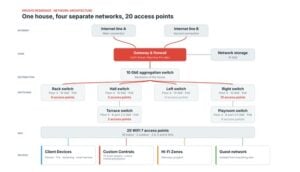
This guide explains how we think about zones on a large property: which segments are worth having, what the rules between them should be, how to let a guest play music on a streamer without handing them the rest of the network, and what to document so that the design survives its first change of installer. It supports our managed home network and network takeover services, and it applies equally to a London house, a country estate or an Alpine chalet. For a worked example, see our private residence UniFi network install, where four separate networks run across three floors.
Why a Flat Network Fails on an Estate
On a flat network every device sits in the same broadcast domain and can reach every other device by default. For a small flat that is harmless. On an estate it creates three separate kinds of failure. The first is security: a single weak device, such as a cheap internet-connected gadget with an unpatched firmware, becomes a foothold from which an attacker or a piece of malware can look for everything else on the network, including the control system and the camera recorder. The second is privacy: guests and staff share a network with the family’s devices and shared folders, so the only thing standing between them and personal data is whatever each device has set for itself.
The third is reliability, and it is the one households notice first. Broadcast and multicast traffic grows with the number of devices, and a network with several hundred devices on one segment spends a surprising share of its airtime and switch capacity on chatter. A guest’s device that misbehaves, a streaming box that floods the network with discovery packets or a loop made by a well-meaning plug-in cable can then degrade the control system and the cameras as well. Splitting the network into zones contains each of these problems to the segment where it started.
There is also a management argument. A network that has been divided on purpose is one that a competent engineer can reason about: a camera problem is investigated in the camera zone, a guest complaint in the guest zone. A flat network offers no such structure, which is why audits of inherited networks so often find that nobody can say with confidence what is connected or what can reach what.
What a VLAN Is and What It Is Not
A VLAN, or virtual local area network, is a way of dividing one physical network into several logical ones. Switch ports and wireless networks are assigned to a VLAN, and devices in different VLANs cannot talk to each other directly at the Ethernet level, even when they are plugged into the same switch. If they are to communicate at all, their traffic has to pass through a router or a layer 3 switch, and that is the point at which firewall rules can allow or refuse it.
That last sentence matters, because a VLAN on its own is not a security boundary. It is a separation that becomes a boundary only when the routing between VLANs is controlled. A network in which every VLAN can route freely to every other has the cosmetic appearance of segmentation and none of the protection. The design effort therefore goes into the rules between zones, not into the number of zones, and the right question for each pair of zones is what, specifically, needs to cross between them.
Each VLAN also gets its own address range and its own DHCP scope, so that the segment a device is in is obvious from its address. On a large property the scopes need sizing with room to grow. A segment designed for fifty devices that later needs three hundred is a common reason for a network to be re-addressed under pressure, so we size each zone for several times its current population and leave the ranges documented.
 Managed Home NetworkMonitoring, updates and support for large homes and estates.
 Network Takeover and SupportA network installed by someone else, documented and secured.
 Network DesignCabling, comms rooms and segmentation planned before the walls close.
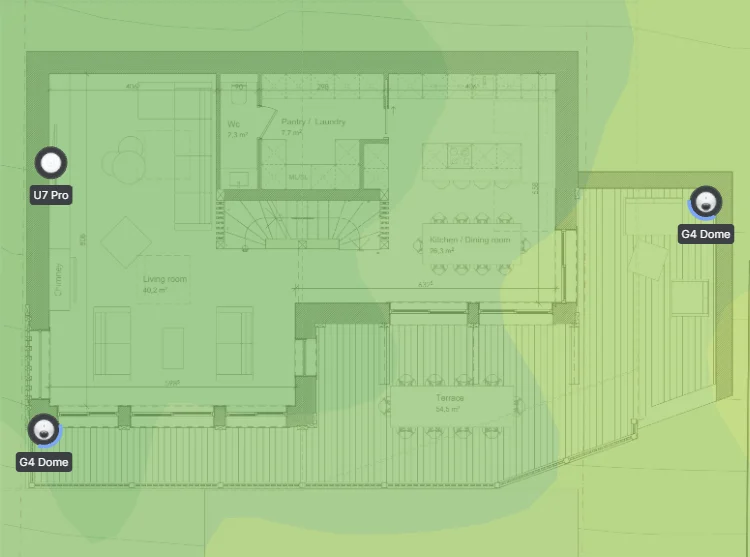 Home Network and WifiThe full range of wifi and network services.
 Network Audit and RescueFind out why a network fails and what it takes to fix it.
The Zones We Design For Large Properties
No two properties are identical, but most large homes and estates end up with a recognisable set of zones. The table below shows a typical arrangement. It is a starting point for the survey and design, not a template: a house with no staff has no staff zone, and an estate with several buildings may repeat some of these segments in each building.
| Zone | What lives in it | Rule of thumb for what it may reach |
|---|---|---|
| Household | Family phones, laptops, tablets, televisions and games consoles | The internet, the shared media and printing services it needs, and the control interfaces for the property |
| Guest | Visiting guests’ devices | The internet only, plus the specific music or television devices guests are meant to use |
| Staff | Staff phones and devices, estate office equipment | The internet and the systems staff need to do their work, kept apart from the household |
| Control and AV | Automation processors, lighting, shading, climate, audio and video distribution, the cinema | Each other and the devices they command; reached by touch panels and apps only through defined paths |
| Cameras and security | Cameras, recorders, door stations, alarm panels, access control | Their recorder and management systems; no general access to the internet or to other zones |
| Building services and IoT | Smart appliances, EV chargers, pool and plant controllers, other connected gadgets | Only what each device genuinely needs, usually a cloud service or a controller |
| Management | Switch, access point and gateway management interfaces, monitoring | Administrators only; no access from guest, staff or household devices |
Two principles shape this list. First, a zone exists because its devices share a trust level and a purpose, not because it makes the diagram tidy. Second, the fewer zones that achieve the separation, the better. Every additional VLAN is another set of rules to maintain, another place for discovery protocols to fail and another thing for the next engineer to understand, so we keep the structure as simple as the property allows.
Rules Between Zones: Default Deny and Allow What Is Needed
The method that works is to start from refusal. Traffic between zones is blocked by default, and rules are added to permit the specific flows that the property needs. The reverse method, allowing everything and blocking known problems, always leaves holes, because nobody knows what the next problem device will be. A default-deny design also documents itself: the list of permitted flows is the list of things the network is meant to do.
The flows to permit are usually short. Household devices need to reach the control system’s apps and touch panels on the ports those need. The control processors need to reach the devices they command. Cameras need to reach their recorder, and the recorder needs to be reachable for viewing, ideally through a defined path rather than by letting every device browse the camera network. Management traffic should be reachable only from a management workstation or a VPN session. Guests need the internet and nothing else, apart from the specific exceptions described below.
Direction matters as much as destination. Most rules should allow traffic to be started from one side only: a household phone may open a connection to the control processor, but the control processor has no reason to open connections to household phones. Stateful firewalls handle the replies automatically, so a rule that says household may start connections to control, and not the reverse, gives the app everything it needs and gives a compromised controller nothing to work with.
Guests, Streamers and the Discovery Problem
The hardest practical question in zone design is also the one owners ask most often: how can a guest play music on the house’s streamers without being given access to the rest of the network? Phones find AirPlay speakers, Chromecast devices and many streamers through multicast discovery protocols such as Bonjour, also called mDNS. Multicast discovery does not cross from one VLAN to another, so a guest in the guest VLAN cannot see a streamer in the control VLAN, even if the firewall would let the music through. People then conclude that the segmentation is broken, and the usual outcome is that someone opens everything up.
The solution has two halves, and keeping them separate is what makes it safe. The first is discovery: the guest device must be able to learn that the streamer exists. Most enterprise platforms provide a discovery relay for this. UniFi offers an mDNS proxy with automatic, off and custom modes, and Cisco Meraki provides Bonjour forwarding on its access points and on its MX security appliances. A relay, configured to pass only the services we choose between named zones, lets the streamer appear in the guest’s device without exposing anything else.
The second half is the media path: the firewall must allow the guest zone to send the audio stream to that particular device, and no other. Discovery working does not mean the stream will flow, and a stream allowed to one device does not mean the guest can reach the rest of the control zone. In practice we allow the guest zone to reach a short list of named devices on the ports they need, nothing else, and test it from a real guest device before handover.
Where a property has many guests, or where discovery has to be trouble-free, a cleaner option is to place the shared entertainment devices in their own small zone that both the household and guests can reach, instead of reaching into the control zone. The streamer then sits in a segment with no other function, so that guest access to it carries no wider consequence. Some systems also offer guest-friendly alternatives such as a code or an app that avoids multicast discovery altogether, and where one exists it is often the most robust answer. Whichever approach is chosen, it is a design decision made with the property’s guests in mind, not an afterthought.
Wireless: One Network Name or Many
Each zone that Wi-Fi devices belong to needs a way of getting them into the right VLAN. The traditional method is one network name, or SSID, per zone: a household network, a guest network and a staff network. It is easy to understand, and it works, but every additional SSID adds management traffic to every access point, which uses airtime that could carry data. On a large property with many access points this adds up quickly, so we keep the number of SSIDs low.
The alternative is a per-device key, which lets a single SSID place different devices into different VLANs depending on the passphrase each uses. The feature has different names on different platforms: UniFi calls it a private pre-shared key, Cisco Meraki an identity pre-shared key, and Ruckus a dynamic pre-shared key. With it, the household, a staff member and a smart television can all join the same network name with their own keys and land in their own zones. Individual keys can be withdrawn without changing anyone else’s, which suits a house with changing staff and visitors.
Per-device keys are not free of caveats. Support varies by platform and by the wireless security mode in use, so the choice has to be checked against the equipment and the devices that will connect, and cheap smart-home devices that only join 2.4 GHz networks sometimes need their own treatment. Devices that need to be on a particular VLAN, such as a controller with a wired fallback, are better connected by cable to a port assigned to the right zone. We decide the wireless approach during the design, with the guest, staff and household patterns of the property in mind.
Cameras, Staff and Multiple Buildings
Cameras deserve their own zone for two reasons. They are a high-value target, because a compromised camera can reveal the occupants’ movements, and they are often the least well-maintained devices on the network, with long-lived firmware and limited security. A camera zone with no route to the internet and no access to other zones, apart from its recorder, closes most of the common ways in. Remote viewing is then provided through the recorder or a managed remote-access service, rather than by exposing cameras to the internet directly.
Staff are a different case. A staff zone gives estate staff a network that does the job without exposing the household. It matters most where staff live on the estate, because their personal devices would otherwise be on the same network as the family’s. A separate segment, with its own name and rules, also makes it straightforward to change access when people join or leave, without touching anyone else’s configuration.
On an estate with several buildings, each building usually becomes a managed part of the same network, linked by fibre or point-to-point wireless and carrying the same zones. The guest house has a guest zone, the staff accommodation a staff zone, and the main house all of them, all managed centrally. Because each building is part of one design, a guest in the guest house gets the same rules as a guest in the main house, and the staff cottage’s devices are kept apart from the principal residence even though the cable between them is shared.
Management Access, Documentation and Testing
The management network is the one that is least often built and most worth building. Access to switches, access points and gateways should be possible only from a management zone, reached by administrators and monitoring systems, and not from guest, staff or household devices. Administrator accounts are individual, strong and removed when someone leaves. Remote access, where it is needed, is provided through a VPN or a managed cloud platform and not by forwarding ports from the internet to equipment inside the property.
Documentation is the difference between a design and a pile of settings. For every zone we record the VLAN number and name, the address range and DHCP scope, which ports and SSIDs belong to it, and the rules that allow traffic in and out, with a note of why each exception exists. That record is what lets a different engineer take over without having to rediscover the network, and it is what our network takeover service produces for networks that arrive without one.
Finally, the design is tested as built. From a device in each zone we check that what should be reachable is reachable and that what should be blocked is blocked: a guest phone cannot see the control system, a staff laptop cannot reach the cameras, a household phone can operate the touch panel app and play music to the intended devices. Testing from real devices, rather than reading the configuration, finds the rule that was typed wrongly or the discovery relay that was never switched on.

Mistakes We See on Inherited Networks
Most of the networks we are asked to look at have some form of segmentation, because installers know it is a good idea. The problems are usually in how it was done, and they repeat. The list below is the one we use when reviewing a network that has arrived from another installer.
- VLANs with no rules between them. The zones exist, but routing is open, so the separation is purely cosmetic.
- Too many zones. A dozen VLANs designed for a theoretical risk, each with exceptions, none of them understood by anyone left in the building.
- Discovery ignored. The streamers and televisions were placed in a different zone from the phones that control them, nothing relays discovery, and the fix was to put everything back on one network.
- Address ranges too small. A zone filled up as devices were added, and addresses were reassigned in a hurry.
- No management separation. Anyone on the guest wifi can reach the switch login page.
- Nothing written down. The VLAN numbers and rules exist only inside the equipment.
Each of these is fixable without starting again, and an audit can usually separate the changes that matter from those that do not. The common thread is that segmentation is a design problem and a documentation problem as much as a configuration one, and that the people who will live with the result, the household, guests and staff, need to be part of the thinking.

Frequently Asked Questions: VLANs and Network Zones
- What is a VLAN in a home network?
A VLAN is a logical division of one physical network into separate segments. Devices in different VLANs cannot talk to each other directly, and any traffic between them has to pass through a router or firewall, where rules decide what is allowed. On its own a VLAN is not a security boundary; the rules between VLANs are what make it one. - How many VLANs does a large home need?
As few as achieve the separation the property needs. A typical large home uses a household zone, a guest zone, a control and AV zone, a camera zone and a management zone, and adds a staff zone or building services zone where there are staff or many connected appliances. More zones means more rules to maintain, so we keep the structure as simple as the property allows. - Can a guest on a separate network still play music on the house’s speakers?
Yes, when the design allows for it. Discovery protocols such as Bonjour do not cross VLANs by default, so a discovery relay, such as the mDNS proxy on UniFi or Bonjour forwarding on Meraki, is configured for named services, and a firewall rule allows the guest zone to send the stream to the specific devices guests are meant to use and nothing else. - Why do my AirPlay or Chromecast devices disappear when I add VLANs?
They use multicast discovery, which stays inside one VLAN. Putting the phone and the streamer in different VLANs hides the streamer. The fix is a discovery relay and a narrowly scoped firewall rule, not removing the segmentation. - Should smart home devices be on their own network?
Generally yes. Cheap connected devices are often poorly maintained, so placing them in their own zone with limited access contains the damage if one is compromised. Automation processors and the devices they command usually sit together in a control zone, reachable by touch panels and apps through defined paths. - Do cameras need a separate network?
We recommend it. Cameras are attractive targets and often run old firmware. A camera zone with no route to the internet and no access to other zones apart from its recorder removes most common attack paths, with remote viewing provided through the recorder or a managed service. - Can you add VLANs to a network someone else installed?
Usually, yes. Our network audit and takeover services document what is there, identify what can be separated and put the zones, rules and records in place, with changes that affect connectivity planned at times that suit the household.
Managed Home Network → · Network Takeover and Support → · Network Design for New Builds → · UniFi Network Case Study → · Discuss your property →