What a Network Handover Pack Should Contain
The records every large home network needs
Published November 2026 · Custom Controls · Home network and smart home specialists since 1998
When a network is finished, the installer leaves and the household lives with the result. If something goes wrong in a year, or in ten, the question that decides how quickly it is fixed is simple: does anyone know how this network is built? On far too many large homes the honest answer is no. The installer has retired or closed, the person who knew the passwords has moved on, and the network exists only as a collection of equipment whose configuration is known only to itself.
A handover pack is the remedy. It is the set of records that lets a competent engineer, who has never seen the property, understand the network, support it and change it without having to rediscover everything. It protects the household against the loss of any one person’s knowledge, including the installer’s, and it is the difference between a network that can be supported for decades and one that has to be rebuilt the first time something fails.
This guide sets out what a good network handover pack contains, and why each part is there. It is the standard we hold our own installations to, and it is the record we produce when we take over networks installed by others through our network takeover and support service. It is equally a checklist for owners and project managers who want to know what to ask for.
Why a Handover Pack Matters More on Large Properties
A flat has a router and a few devices, and a missing manual is an inconvenience. A large home or estate has several equipment cabinets, multiple floors, buildings linked by fibre or wireless, dozens of access points and switch ports, separate zones for the family, guests and staff, a control system, cameras and door entry, all depending on the network. Nobody carries that in their head. The documentation is the only place it exists in a form that can be shared.
The failure mode is familiar. A fault appears, and the person called in has to start by working out what is connected to what. They trace cables, log into equipment with unknown passwords, and make changes without knowing what depends on them, so the repair takes longer, costs more and risks breaking something else. With a good pack, the same fault is diagnosed in minutes because the topology, addressing and equipment are all on record.
The pack also protects the owner’s freedom. A network documented well enough to be picked up by any competent engineer is a network that is never dependent on one contractor, including us. That is the right way round: the household chooses its support on merit, and not because nobody else can understand the system.
The Network Overview and Topology
The pack opens with a plain-English overview: what the network is for, how it is organised, which buildings and areas it serves and which systems depend on it. It is written for the owner and the household manager as well as for engineers, so that anyone with a stake in the property can understand what they have. A short description of the design logic, such as why access points are where they are and why the zones are divided as they are, helps whoever works on it later to extend it in the same spirit.
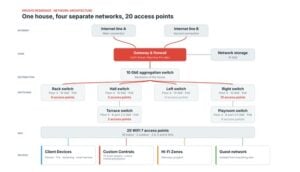
A topology diagram follows. It shows how the internet connections reach the property, where the firewall and core switches sit, how the equipment cabinets and buildings link together, and where the access points are. A good diagram is accurate, current and readable, with each device identified the same way it is identified in the equipment and cabling records. It is the single most useful page in the pack, and the first thing an engineer reaches for.
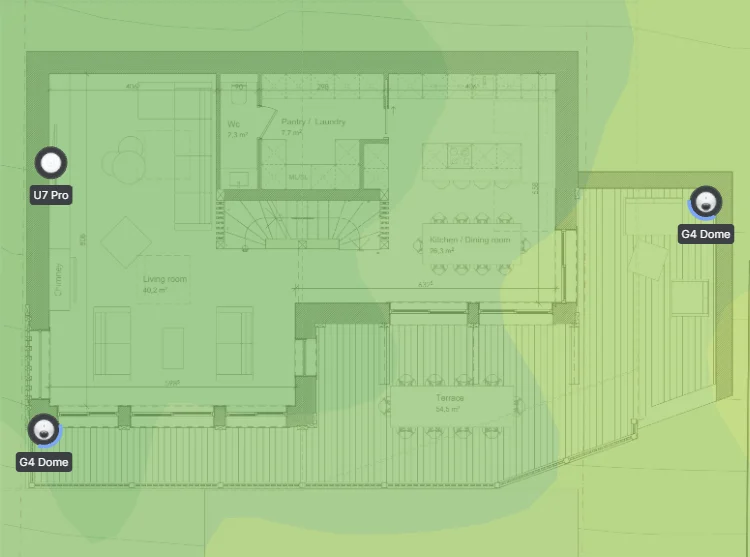
Floor plans marked with the positions of equipment rooms, cabinets, access points, cameras and other network devices complete the picture. They tell an engineer where to find things, and they let the household understand where the cables run before anyone drills into a wall.
 Network Takeover and SupportA network installed by someone else, documented, secured and supported.
 Managed Home NetworkMonitoring and support, backed by current documentation.
 Network Audit and RescueFind out why a network fails and what it takes to fix it.
 Network Design for New BuildsRecords begin at design stage, before the walls close.
 Home Network and WifiThe full range of wifi and network services.
Equipment Schedule
Every piece of network equipment is listed in a schedule: the make and model, the location, the name it has on the network, its serial number and its address. Alongside that, the schedule records the firmware version at handover, the warranty information and any licences associated with the device, with their renewal dates. For platforms that depend on a licence to be managed, the renewal date is a critical piece of information, because letting it lapse can cost the household the ability to manage its own network.
The schedule is more than an asset list. It lets an engineer see at a glance how many access points there are and where, which switches supply power to which devices, and which parts of the network are on equipment that is approaching the end of its supported life. It also makes replacement straightforward, because a failed device can be matched exactly and its configuration restored.
Addressing, VLANs and Firewall Rules
The records of how the network is divided are the ones most often missing. For every zone, the pack records the VLAN number and name, the address range and DHCP scope, which ports and wireless networks belong to it, and the purpose of the zone. It then lists the rules that govern traffic between zones, with a note against each exception explaining why it exists, so that nobody removes a rule that a system quietly depends on or adds one that undermines the separation.
Static addresses and reservations are listed too: the controllers, recorders, door stations and other devices that must keep a fixed address, with the address and the device it belongs to. Where devices are given fixed addresses and nobody records them, the next change risks duplicate addresses and unexplained faults. Our guide to VLAN and network zone design explains how the zones are designed in the first place.
Internet Connections and Failover
The internet side of the network is documented separately from the inside. For each connection, the pack lists the provider, the type of service, the circuit or account identifiers, the support contact and the equipment that terminates it. Where the network has more than one connection, it records the order of preference, the rules for switching between them and the results of the failover test carried out at handover, so that the behaviour is known and can be repeated.
It also records the settings that rely on the connections: where remote access is provided, how it is provided, and what depends on it. If the primary connection is replaced or a mobile SIM is changed, the person making the change knows which settings to check. Our guide to failover design for chalets explains how such a design is built.
Cabling Records and Test Results
The cabling is the part of the network that is hardest to inspect and longest-lived, so its records are valuable. The pack includes a cable schedule that identifies every cable by its label, from which patch panel port it runs to which outlet or device, along with the as-built drawings showing the routes. Fibre links between buildings are recorded with their route, core allocation and the optical test results.
Test results are the evidence. Each copper link is certified against the performance standard and the report is kept, showing that the cable met the specification on the day it was installed. When a fault appears later, the original result shows whether the cabling has changed. Photographs of cable routes and terminations taken before walls were closed, marked on the plans, are priceless to whoever has to open them again.
Wireless Design and Commissioning Results
For the wireless network, the pack records the design and the proof that it works. The design shows the access point positions, the channels and power settings, and the wireless networks with the zones they connect to. The commissioning results show what was measured on completion: coverage and signal strength in each area, throughput at representative locations, and the behaviour of roaming as a device moves through the house.
Recording the wireless results at handover creates a baseline. If the household later reports that the network feels slower, the engineer can compare the present state against the day it was finished, and can see whether something has changed in the radio environment, the equipment or the way the property is used.
Power, Backup and Restart Procedures
The pack records how the network is powered. Which equipment is on battery backup, how long the batteries are expected to last, the order in which equipment should be shut down and restarted, and the location of the circuits and isolators that feed the equipment rooms. It sets out the safe way to restart the network after a power cut, because restarting everything at once can leave devices unable to obtain addresses or reconnect.
A short, plain page for the household, written for non-technical staff, completes the section. It says what to check if the internet seems to be down, which equipment may be safely restarted, who to call and what information they will need. It is the page that is used most in practice, and the one that saves most calls.
Access, Credentials and Licences
Network equipment is administered through accounts, and the pack records how that is arranged: which administrator accounts exist, what each is for, who holds them and how access is recovered if a person is unavailable. Credentials themselves are not printed in the document. They are held in a secure password manager or a similar protected store, with the means of access handed to the right people separately, because a pack that contains passwords in plain text is itself a security risk.
For platforms managed through a cloud service or that require licences, the pack records the licence details and renewal dates, and the contact details for the manufacturer’s support. It also records remote access arrangements: how a support engineer can reach the network, what permissions they have and how that access is removed when it is no longer needed.
Monitoring, Support and Change Records
If the network is monitored, the pack says what is monitored, what triggers an alert and who receives it. Our managed home network service works this way, and the record means that the household and the support team share an understanding of what is watched and what happens when something is flagged. It also lists configuration backups: what is backed up, how often and where the copies are held, so that failed equipment can be replaced and restored.
A change log is started on the day of handover. Every later change, such as a new access point, a new zone, a firmware update or a replaced switch, is recorded with the date, the reason and who made it. The pack is not a document that was finished once. It is a living record that has to be kept current for as long as the network exists, and the habit of updating it is worth as much as the first version.
Format, Storage and Keeping It Current
A pack is only useful if it can be found and read. We provide it as a clear, indexed document with the diagrams and schedules in editable form as well as PDF, so that whoever takes over can update the records and does not have to redraw them. It is stored where the owner, the household manager and the support team can reach it, and the secure items, such as credentials, are stored separately from the main document.
The pack should also be reviewed. When equipment is replaced, a zone is added or a building is connected, the records are updated at the same time, not months later from memory. A network that is looked after by people who keep its documentation current stays understandable, and a network whose records were accurate on the day of handover and never touched again slowly becomes a fiction.
- Overview and topology diagram, with floor plans marking equipment and access point positions.
- Equipment schedule with models, locations, serial numbers, addresses, firmware and licence dates.
- Addressing, VLAN and firewall rule records, with the reason for each exception.
- Internet connection and failover records, including the handover test results.
- Cable schedule, drawings and certified test results, with photographs of concealed routes.
- Wireless design and commissioning results as a baseline.
- Power, backup and restart procedures, with a plain page for the household.
- Access, licence and remote access records, with credentials stored securely and separately.
- Monitoring, backup and change records, kept current.

Frequently Asked Questions: Network Handover
- What is a network handover pack?
A handover pack is the set of records that lets a competent engineer who has never seen the property understand, support and change the network. It includes topology, equipment and addressing records, cabling and test results, failover and power procedures, and the details of access and support. - Should the pack include passwords?
Not in the document. Credentials are held in a secure password manager or protected store, with access handed to the right people separately, because a pack that contains passwords in plain text is itself a security risk. - Why do cable test results matter?
They show that each link met the performance standard on the day it was installed. When a fault appears later, the original result shows whether the cabling has changed, which separates cable faults from equipment faults. - What if my network was installed without documentation?
Our network takeover service surveys the network, records its topology, addressing, equipment and cabling, secures it and brings it under monitoring. The result is a handover pack written so that another competent engineer could pick it up. - How often should the pack be updated?
Whenever the network changes: a new access point, a new zone, a replaced switch or a firmware update. Updating it at the time, not months later, keeps it accurate, and a change log records what was done and why. - Who should receive a copy?
The owner, the household or estate manager, and the support team, with the secure items held separately. Architects and project managers may also need the cabling records and drawings for future building work. - Why do licence renewal dates need recording?
Some platforms need a valid licence to be managed through their dashboard, and letting it lapse can end the ability to manage the network. Recording the renewal dates in the pack makes sure someone is responsible for them.
Network Takeover and Support → · Managed Home Network → · Network Audit and Rescue → · Discuss your network →