Crestron Heating & Air Conditioning Integration
The Benefits of Crestron HVAC Integration
Heating and Air Conditioning integration in to a Crestron Home Automation system makes total sense – particularly for larger properties and holiday homes. Utilising Crestron HVAC systems gives the benefits that clients expect such as precise temperature control and advanced scheduling but they also give many benefits which may be unexpected. The thermostat can provide an easy control layer for traditional radiator and underfloor heating systems, warming a room when the setpoint is higher than the current temperature in the room. The same approach allows almost any type of air conditioning system to be utilised and the thermostat can switch the AC on when the set point is lower than the current temperature in the room. Building in a buffer zone of two degrees ensures the two systems are never in competition with each other and keeps both systems running efficiently. We can also cycle both systems once the target temperature is hit, vastly reducing energy use, particularly in the case of air conditioning which can continue to blow air at the required temperature rather than switching off. We utilised this approach in our Dubai installation and the managed system now runs the estate at approximately half the energy consumption of an equivalent unmanaged property. There are many more benefits which we continue to explore below…
The argument for integration is strongest in exactly the properties we work on most: large homes with many zones, mixed heating and cooling plant, and owners who are not always in residence. A standalone thermostat in each room can only react to the air immediately around it. A thermostat that is part of a whole-home automation system knows whether the house is occupied, whether the blinds are down, what time the family is due home and what every other zone is doing — and it can act on all of that, from the same touchpanels, keypads and app that already control the lighting, AV and security.
Crestron Thermostats – Wired and Wireless
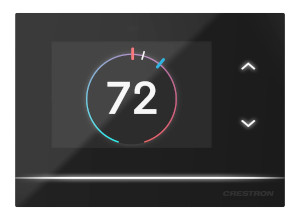
There are two approaches for integrating Crestron thermostats in to a clients home – placing the thermostats in the rooms and centralising them, with the use of remote sensors. The new range of in-room Crestron Horizon Thermostats (the HZ-THSTAT) are aesthetically pleasing and have features such as a touchscreen interface and a proximity sensor to bring the screen to life when required. Available in black, white or almond (HZ-THSTAT-B, HZ-THSTAT-W and HZ-THSTAT-A), the thermostats complement any interior and blend in seamlessly with the rest of the Horizon range of keypads. It is also possible to install the thermostat wirelessly, using the wifi network to talk back to the main home automation processor which can then switch sub systems as required (such as underfloor heating or whole house air conditioning).
The Horizon thermostat (HZ-THSTAT) has a 3.5-inch touchscreen whose display matches the Crestron Home interface, so the thermostat on the wall looks and behaves like the touchpanels elsewhere in the house. Built-in temperature and humidity sensors are joined by proximity and ambient light sensors, and the thermostat connects over 2.4 GHz Wi-Fi. Crestron specifies it for conventional two-stage heating and cooling, heat pump systems with auxiliary heat, two-pipe and four-pipe fan coil units and radiant floor heating, and it can read from up to four remote temperature sensors and two remote temperature and humidity sensors — which matters in large rooms where one reading at the thermostat is not representative of the whole space.
Crestron Thermostats – DIN Rail Mount
For whole home systems it can make sense to install the DIN rail versions of thermostats (DIN-THSTAT) in a central location. They use remote sensors to monitor heating, cooling and relative humidity in a space. As they are mounted in a DIN cabinet they remove the need for a wall mounted thermostat instead relying on wall mounted, unobtrusive, sensors which can be wall papered over or painted to blend in to the most demanding interior design. The front of the DIN module contains a small display to view temperature and humidity settings together with pushbuttons to allow local control. Typically these units are hidden away from client view with all changes made via touch panels or remote controls in the living space.
Between the in-room and DIN-rail options sit Crestron’s wall-mounted CHV-TSTAT and CHV-THSTAT models, and wireless infiNET EX thermostats for retrofit projects where new cabling is not practical. All of them cover forced air, radiant floor and heat pump systems, and multiple thermostats network together so that schedules and setpoints can be adjusted globally from any point in the house. Just as importantly, if communication with the wider system is ever interrupted, each thermostat keeps controlling its own heating and cooling equipment independently rather than failing along with everything else.

Crestron

Climate Control

Smart Home

Lighting Control

WiFi & Networks
Remote Sensors and Where to Put Them
A single thermostat measuring the air right next to itself is a poor proxy for a whole room, and poor sensor placement is the most common reason an otherwise excellent climate system feels imprecise. Crestron’s CHV-RTS and CHV-RTHS remote sensors let one thermostat read from up to four separate points in a room or zone, and an outdoor sensor is available for low-temperature compensation. The thermostat itself can then live out of sight — in an equipment cabinet or on an interior wall — while the reading comes from where the room is genuinely lived in.
We position sensors at the survey and first-fix stage, not after the decorators have finished. That means keeping them away from external walls that take direct sun, from radiators, fireplaces and underfloor manifolds, from door openings and air conditioning outlets, and from the heat of AV equipment and kitchen appliances. In double-height spaces and open-plan living areas we use more than one sensor and let the thermostat work from the combined reading, so that a sunny window at one end of the room does not decide the temperature for the sofa at the other.
Heat Recovery Systems & Renewable Energies
The above thermostats are capable of controlling local devices, closing relays when heat or cooling is required, but for bigger and more complex systems it makes sense for them to report the setpoint and the current temperature to a centralised processor. This information can then be used in a much more proactive fashion, controlling any electrical device in the home. This may mean controlling a heat recovery system to either extract air from an overly warm room or blow warm air in to a room which needs a boost. We can even build in AI to proactively warm a space if the house in general is too warm or proactively warm a space if renewable energies are providing more energy than the home requires. The options for these systems are endless and we love applying our experience to a clients requirements to maximise efficiency in the home and minimise energy use!
Integrating Third-Party Air Conditioning and VRF
Many of the properties we work on already have, or are specifying, a VRF, multi-split or ducted air conditioning system from a manufacturer that does not talk natively to a smart home platform. There are two ways to bring it under Crestron control. The simplest is relay-level control, where the Crestron thermostat calls for cooling exactly as it would for heating. The better option, wherever the plant allows it, is a communicating gateway that exposes each indoor unit to the control system directly.
Cool Automation’s CoolMasterNet and CoolLinkNet bridges are the universal HVAC gateways we reach for most often. They connect to a wide range of manufacturers’ inverter, split and VRF equipment and link to Crestron over Ethernet, with each indoor unit then appearing as if it were native hardware — set point, mode and fan speed all controlled from the same keypads, touchpanels and schedules as everything else. Crestron Home also has extension drivers for Airzone, updated in OS 4.4 to remove the need for complex configuration, and for Polar Bear Design thermostats, which are discovered and configured automatically and can switch a whole property between seasonal schedules in one action. On larger estates, KNX air conditioning can be integrated directly, as it was on our Dubai project.
Scenes, Scheduling and Pre-Emptive Comfort
Climate control means little in isolation; its real value shows up in how it responds to a single command alongside everything else in the house. An Away scene does not just lock the doors and arm the alarm — it sets every zone back to an energy-saving setback temperature at the same time. A Home scene, triggered by a keypad at the front door or by the Crestron Home app’s geofencing as the owner approaches, brings every zone back to its comfort setting as the lights and AV system wake up. A Goodnight scene lowers bedroom temperatures for sleep while leaving a nursery or a guest room exactly where it was.
The most effective schedule is the one that finishes its work before anyone notices there was a problem to solve: a bedroom brought up to temperature before the alarm goes off rather than when it does, or a home cinema pre-cooled ahead of an evening screening rather than catching up once a full room and a projector have already raised the temperature. Shading is part of the same conversation. Motorised blinds that lower automatically against direct summer sun reduce the cooling load the air conditioning has to work against in the first place, which is why we treat lighting and shading control and climate as one design exercise rather than two unrelated systems that happen to share a building.
Holiday Homes and Remote Management
For second homes, chalets and villas that sit empty for weeks at a time, integrated climate control is less a convenience than a necessity. The Crestron Home app gives full remote access to every zone from anywhere in the world, as long as the processor has an internet connection, so a property can be held at a setback temperature while it is empty and brought up to comfort temperature ahead of the owner’s arrival — without relying on a caretaker to visit and adjust thermostats by hand.
The same connection lets us, as the dealer, monitor and adjust a Crestron Home system remotely, so most climate issues can be diagnosed and resolved with a phone call rather than a site visit. For owners based abroad, or properties in the Alps and the Middle East where our Crestron team works regularly, that remote support is often the deciding factor in choosing an integrated system over separate standalone controls.
Installation Practice: Getting It Right
Most HVAC integration problems are decided long before commissioning. The heating and air conditioning contractor, the M&E consultant and the control system installer need to agree early which system owns the control logic, how each zone will be called — volt-free relay, communicating gateway or KNX — and where every thermostat, sensor and gateway will sit. Zones in the control system should match the zones in the plant, and the cabling for sensors, thermostats and gateways needs to be in place at first fix, with a network designed to carry wireless thermostats reliably across the whole property.
At commissioning we test every zone’s heat and cool calls individually, confirm the buffer between heating and cooling setpoints, check that scenes and schedules drive the right zones, and verify that each thermostat continues to control its own plant if the network is disconnected. Only then do we set up the household’s schedules with them, so that the system is tuned to how the house is actually lived in rather than left on factory defaults.
Crestron Home OS Integration
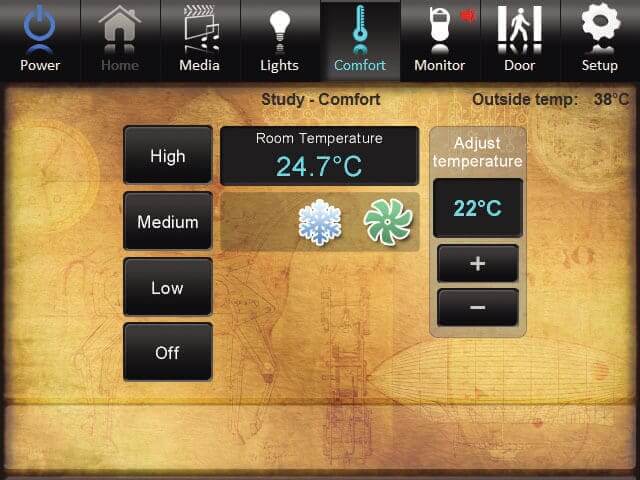
The in-room Crestron Horizon thermostats and DIN rail mountable versions (such as the DIN-THSTAT with remote sensors) both work natively with Crestron Home OS 4: simply search for the device on the network, assign it to a room and you are done. Easy configuration of the onboard relays allows control of heating and cooling in a very straight forward manner! The thermostat information such as set point and current temperature can then be viewed on other touch panels around the home and schedules easily adjusted as required.
Each Crestron Home OS 4 update has steadily widened the range of HVAC extension drivers available, and the current release is Crestron Home OS 4.12. Our Crestron Home complete guide covers the latest OS updates in detail, and our climate control service page covers the full range of thermostats and gateways we install.
Frequently Asked Questions
Can Crestron control both heating and air conditioning in the same room?
Yes. A single Crestron thermostat can call for heat when the room is below its setpoint and for cooling when it is above, with a buffer of around two degrees between the two so that radiators or underfloor heating and the air conditioning never work against each other. Both systems then appear as one climate control on every touchpanel, keypad and app in the house.
Do I need a thermostat on the wall in every room?
No. DIN-rail thermostats such as the DIN-THSTAT can be installed centrally in an equipment cabinet, reading from small remote sensors in each room that can be painted or papered over. Where a visible control is wanted, the Horizon thermostat matches the Horizon keypad family, and Polar Bear Design thermostats can share a wall plate with the lighting keypads.
Can Crestron work with my existing VRF or split air conditioning system?
In most cases, yes. Where the air conditioning manufacturer does not talk to Crestron directly, a Cool Automation CoolMasterNet or CoolLinkNet gateway connects the indoor units to Crestron over Ethernet, so each unit’s set point, mode and fan speed can be controlled like native hardware. KNX air conditioning systems, such as the one on our Dubai estate, can also be integrated directly.
Can I control the heating in a holiday home remotely?
Yes. The Crestron Home app gives full remote access to temperature and scheduling from anywhere in the world, as long as the processor has an internet connection. A property can be held at an energy-saving setback temperature while it is empty and brought up to comfort temperature ahead of arrival.
Will the heating still work if the Crestron network goes down?
Yes. Crestron thermostats keep controlling their own heating and cooling equipment independently if communication with the wider system is interrupted, so a network fault does not leave a room without heat. Central scheduling and whole-home scenes resume as soon as communication is restored.
Climate Control → · Crestron Home Automation → · Crestron Home Guide → · Contact Us →