What Is Control4? The Complete Guide to Smart Home Automation
How Control4 Works, Explained by a Certified Dealer
Updated June 2026 · Custom Controls · Certified Control4 dealers since the platform’s early UK adoption, alongside Crestron and Lutron

If you’ve been researching smart home systems, you’ve almost certainly come across Control4. It’s one of the most widely installed professional home automation platforms in the world, with hundreds of thousands of systems deployed globally and a dealer network spanning more than 100 countries. But “what is Control4” turns out to be a more interesting question than it first appears — because the honest answer involves understanding not just what the platform does, but how it compares to the alternatives, and whether it’s actually the right specification for your particular home.
This guide answers that question properly. We are certified Control4 dealers, and we install it regularly — but we are also certified Crestron and Lutron dealers, which means we have no commercial incentive to oversell Control4 beyond what it’s genuinely good at. Where Control4 is the right answer, we’ll tell you why. Where it isn’t, we’ll tell you that too.
Control4 in One Paragraph
Control4 is a professional home automation platform that brings lighting, audio, video, climate, security, access control and window treatments into a single interface — a wall-mounted touchscreen, a handheld remote, a phone app, or simply your voice. Rather than juggling six different apps for six different systems, everything in the home responds to one consistent set of controls, programmed specifically around how your household actually lives. It is installed exclusively by trained dealers rather than sold as a consumer product, which is the main reason it performs more reliably than the DIY smart home gadgets most people have already tried and been disappointed by.
How Control4 Actually Works
Understanding Control4 starts with understanding what it isn’t. It isn’t a single smart speaker, a single app, or a single piece of hardware you buy off a shelf. It’s an integration platform — its entire purpose is to sit on top of dozens of other manufacturers’ equipment and make them behave as one coherent system.
At the centre of every installation is a Control4 controller — a small processor, usually mounted in a rack or cupboard out of sight, that runs the system’s programming and talks to every connected device on the network. Lighting modules, audio matrices, thermostats, door locks, cameras and AV receivers all connect back to this controller, either directly or through their own manufacturer-specific bridge.
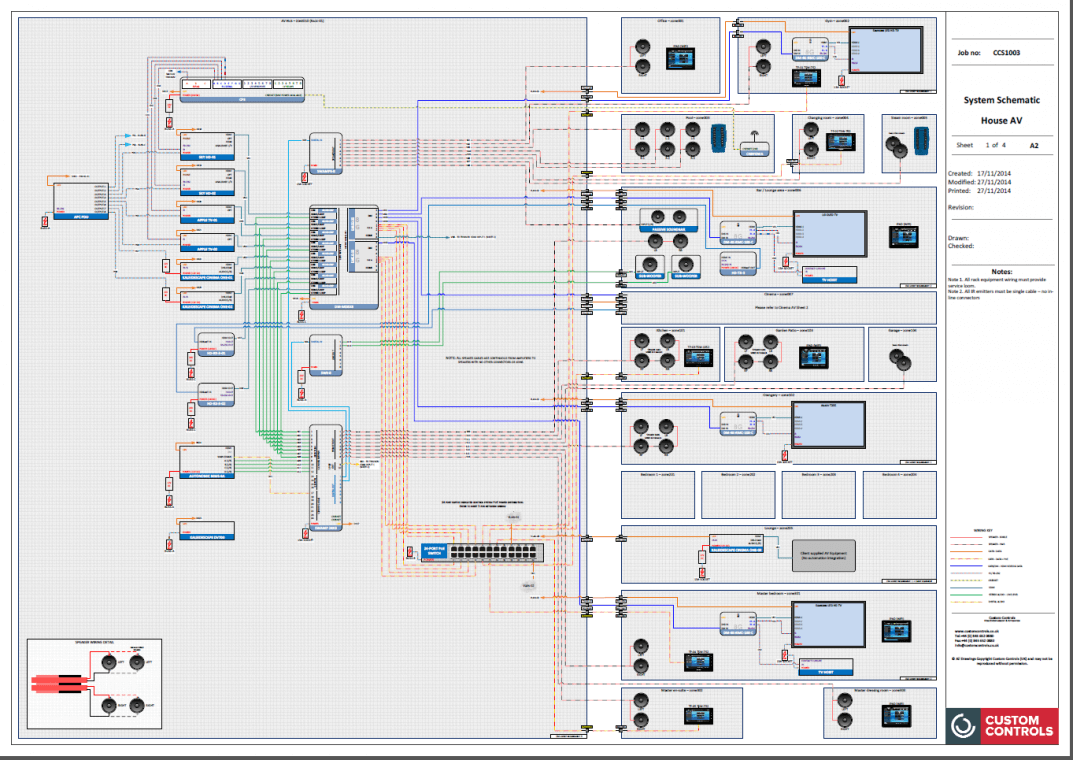
What makes this practical rather than a custom-coding nightmare is Control4’s driver library — a catalogue of more than 13,000 pre-built integration files covering virtually every consumer and professional smart device sold today. When we specify a Lutron lighting system, a Sonos zone or a Yale smart lock alongside Control4, we are not writing new code to make them talk to each other — we are selecting the existing driver and configuring it for your home. This is the single biggest reason Control4 deploys faster and costs less than a fully bespoke system: most of the engineering work has already been done by Control4 and the hardware manufacturer, well before we arrive on site.
Once everything is connected, the actual day-to-day experience is built around scenes and rooms. A “Movie Night” scene might dim the lounge lighting to 20%, lower the blinds, switch the TV to the right input and turn on the soundbar — all from one button, all properly sequenced so nothing happens out of order. A “Goodnight” scene might lock every door, arm the alarm, turn off every light in the house except a single hallway nightlight, and lower the bedroom thermostat by two degrees. These aren’t generic templates; every scene is configured specifically for your home during installation.
Control4 OS — What’s Changed and What’s Current
Control4’s operating system has gone through several major generations, and which version a system runs has a real effect on what it can do. If you are evaluating a home with an existing Control4 system, or comparing quotes from different installers, this matters.
OS 3 was the long-standing previous generation — capable, widely deployed, but increasingly dated against current expectations for app responsiveness and voice integration.
OS 4 (referred to as Control4 X4 on current touchscreens and the app) is the current platform, and it represents a genuine step forward rather than a cosmetic refresh. The home screen now surfaces favourites and active media sessions immediately, rather than requiring navigation through nested menus to find what you actually want. A Quick Actions bar handles the handful of commands every household uses constantly — lights off, lock up, movie mode — without digging through room-by-room screens.
The most significant change for homeowners who like to tinker is Routines — Control4’s automation engine — which can now be created and adjusted directly through the app rather than requiring an installer visit for every small change. A visual timeline shows exactly what’s scheduled to happen and when, and a gallery of ready-made templates gives a starting point for common automations (porch light at sunset, blinds closed at dusk, and so on) that you can then customise.
X4 also brought deep native Apple integration: Siri voice control built into the platform rather than bolted on, Apple Home app compatibility, CarPlay scene launching from the car before you’ve even pulled into the driveway, and iPhone home screen widgets that trigger scenes without opening the Control4 app at all. For a household already built around Apple devices, this level of integration is currently ahead of most competing platforms at a comparable price point.

Smart Home

Lighting Control

Multi-Room Audio

Climate Control

Security
What Control4 Actually Controls
The honest scope of a Control4 installation depends entirely on what the household wants automated — the platform itself imposes few real limits. The categories we specify most consistently:
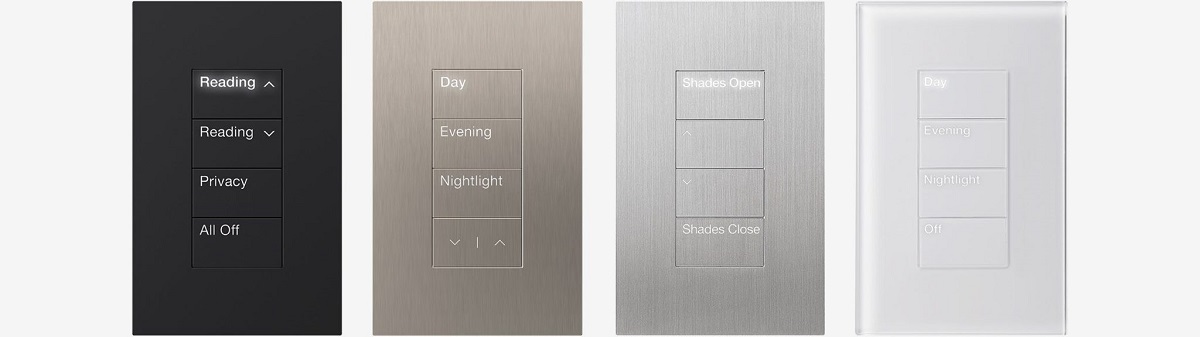
Lighting. Control4 includes its own native lighting dimmers and keypads, suitable for projects where a single-manufacturer approach is the priority. For projects where lighting and shading quality matters more than anything else in a room — a formal drawing room, a cinema, a principal bedroom — we frequently specify Lutron for the lighting layer specifically, integrated within the wider Control4 system via Control4’s native Lutron driver. You get Lutron’s market-leading dimming precision and keypad quality, with Control4 handling everything else.
Multi-room audio and video. Any source — a streaming service, a satellite box, a Kaleidescape movie server, a vinyl deck — distributed to any room, with each space able to play something different or join together for a party. Control4’s own audio matrices handle this natively, or we integrate Sonos for a more budget-conscious whole-home audio layer underneath the same Control4 control surface.
Climate. Thermostats, underfloor heating zones and air conditioning units report into Control4, giving room-by-room scheduling and the ability to fold heating into broader scenes — a “Welcome Home” scene that warms the house as you approach, for instance, using geofencing on your phone.
Security and access. CCTV cameras, door locks, alarm panels and video intercoms are common Control4 integrations. A visitor at the gate can appear on every screen in the house simultaneously; a door can be unlocked remotely for a delivery; an alarm trigger can flash exterior lights and notify your phone, all without separate apps for each system.

Window treatments. Motorised blinds and curtains — frequently Lutron’s own Palladiom and Sivoia ranges — close automatically for solar gain, privacy or simply as part of a scene, with no separate remote required.
Control4 vs Crestron — The Question Every Serious Buyer Asks
If you’ve read more than one smart home comparison article, you’ll have seen Control4 and Crestron mentioned in the same breath constantly. The distinction genuinely matters, and it isn’t about which brand is “better” in the abstract — it’s about programming philosophy.
Crestron is programmed entirely from scratch for every project. There is no template, no driver library shortcut — every scene, every automation behaviour, every interface screen is custom-built specifically for that house, with no theoretical ceiling on complexity. This is precisely why Crestron tends to specify on the largest, most demanding residential projects: multi-building estates, highly unusual third-party integrations, or households that want an interface designed entirely around one specific way of living. The trade-off is time and cost — bespoke programming takes longer and costs more than configuring from a template.
Control4 is configured from its driver and template library. This isn’t a lesser approach — it’s a different one, optimised for faster deployment and a more accessible price point while still delivering genuinely capable whole-home automation for the overwhelming majority of residential projects. For a four-to-six-bedroom home wanting unified lighting, AV, climate and security control, Control4 typically delivers a result that is, in practical day-to-day use, indistinguishable from a Crestron system costing considerably more.
We install both, and the honest answer to “which one do I need” almost always comes down to scale and specificity rather than absolute quality. If your project is large, architecturally unusual, or needs an interface built around one very particular workflow, Crestron is worth the investment. For the majority of residential automation projects, Control4 is an excellent, fully capable answer — and we’ll tell you so directly rather than steering every enquiry toward the more expensive platform. Read our full three-way comparison of Crestron, Lutron and Control4 →
What Does a Control4 System Cost?
The cost of a Control4 system depends heavily on scope. A meaningful single-area system — lighting and AV in a living space, say — is a very different project from a genuine whole-home system across a four-to-five-bedroom property covering lighting, multi-room audio, climate and basic security integration. The main cost drivers are the number of rooms, the complexity of the AV distribution, and how much third-party hardware (Lutron lighting, a dedicated cinema room, extensive CCTV) is layered in, and larger properties or more ambitious specifications increase the scope further. We provide free, detailed, no-obligation quotations rather than a one-size-fits-all price list, because the honest cost of a Control4 system depends entirely on what you actually want it to do.
Is Control4 Worth It? The Honest Answer
For the right project, yes — clearly. The most common alternative isn’t Crestron, it’s a pile of separate consumer smart home gadgets bought individually: a smart thermostat from one brand, smart bulbs from another, a video doorbell from a third, none of which were ever designed to talk to each other. That approach frequently ends in exactly the frustration most people associate with “smart home technology” — apps that don’t sync, automations that silently stop working, devices that lose connection to the WiFi and need resetting. A professionally installed Control4 system is built and tested as one coherent system from the outset, by people who are accountable for it working, with the manufacturer support and dealer network behind it that a budget smart plug simply doesn’t have.
Where Control4 is not the right answer is at the very top end of scale and bespoke complexity — an enormous estate, a genuinely unusual integration requirement, or a brief that calls for an interface built around one very specific way the household wants to interact with their home. That’s Crestron territory, and we’ll say so plainly if that’s what your project actually needs.
Talk to a Dealer Who Installs Both
We are certified Control4 dealers, and we are certified Crestron and Lutron dealers too. That means our recommendation for your specific project is based on what your home and your brief actually need, not on which platform we’d rather sell you. Read more about our Control4 installation service → or contact us for an honest, no-obligation consultation.
Frequently Asked Questions — Control4
What is Control4 in simple terms?
Control4 is a professional home automation platform that unifies lighting, audio, video, climate, security and access control into one system, controlled from a touchscreen, remote, app or voice command. It’s installed by trained dealers rather than sold as a DIY product, using a library of over 13,000 pre-built device integrations to deploy faster and more reliably than piecing together separate consumer smart home gadgets.
Is Control4 better than Crestron?
Neither is categorically “better” — they suit different scales of project. Crestron is programmed entirely bespoke with no limit on complexity, suiting the largest and most unusual projects. Control4 is configured from a driver and template library, deploying faster and more cost-effectively for the majority of residential automation projects. We install both and recommend based on the specific brief.
What is Control4 OS 4 / X4?
X4 is Control4’s current operating system. It introduces a redesigned home screen that surfaces favourites immediately, homeowner-editable Routines with a visual timeline, and deep Apple integration including native Siri control, Apple Home compatibility, CarPlay scene launching and iPhone home screen widgets.
Can Control4 work with Lutron lighting?
Yes. Control4 integrates natively with Lutron lighting and shading systems via a dedicated driver. We regularly specify this combination — Lutron for dimming and keypad quality, Control4 for everything else — on projects where lighting performance matters most.
How much does a Control4 system cost?
The cost depends on scope: a single-area system and a whole-home system across a four-to-five-bedroom property are very different projects, shaped by the number of rooms, the complexity of the AV distribution and how much third-party hardware is included. We provide free, detailed quotations based on your specific brief.
Can an existing Control4 system be upgraded to the current platform?
Yes. We regularly upgrade older Control4 systems — including those installed by other companies — to the current OS 4 / X4 platform, and take over ongoing support and reprogramming where the original installer is no longer available.
Control4 Dealer & Installer → · Crestron Home Automation → · Lutron Lighting Control → · Smart Home Automation Guide → · Crestron vs Lutron vs Control4 →